TimeTravel Dashboard: A Visual Tour of Shayntech's Database Time Machine
You've heard about database time travel — querying your data as it existed at any point in time, immutable hash chains, and auto-generated SOC 2 evidence. But what does it actually look like?
Today we're taking the TimeTravel Enterprise Dashboard for a spin. One docker-compose up -d and you get a full-featured web UI for database version control, compliance reporting, and cryptographic chain verification. Here's a live walkthrough.
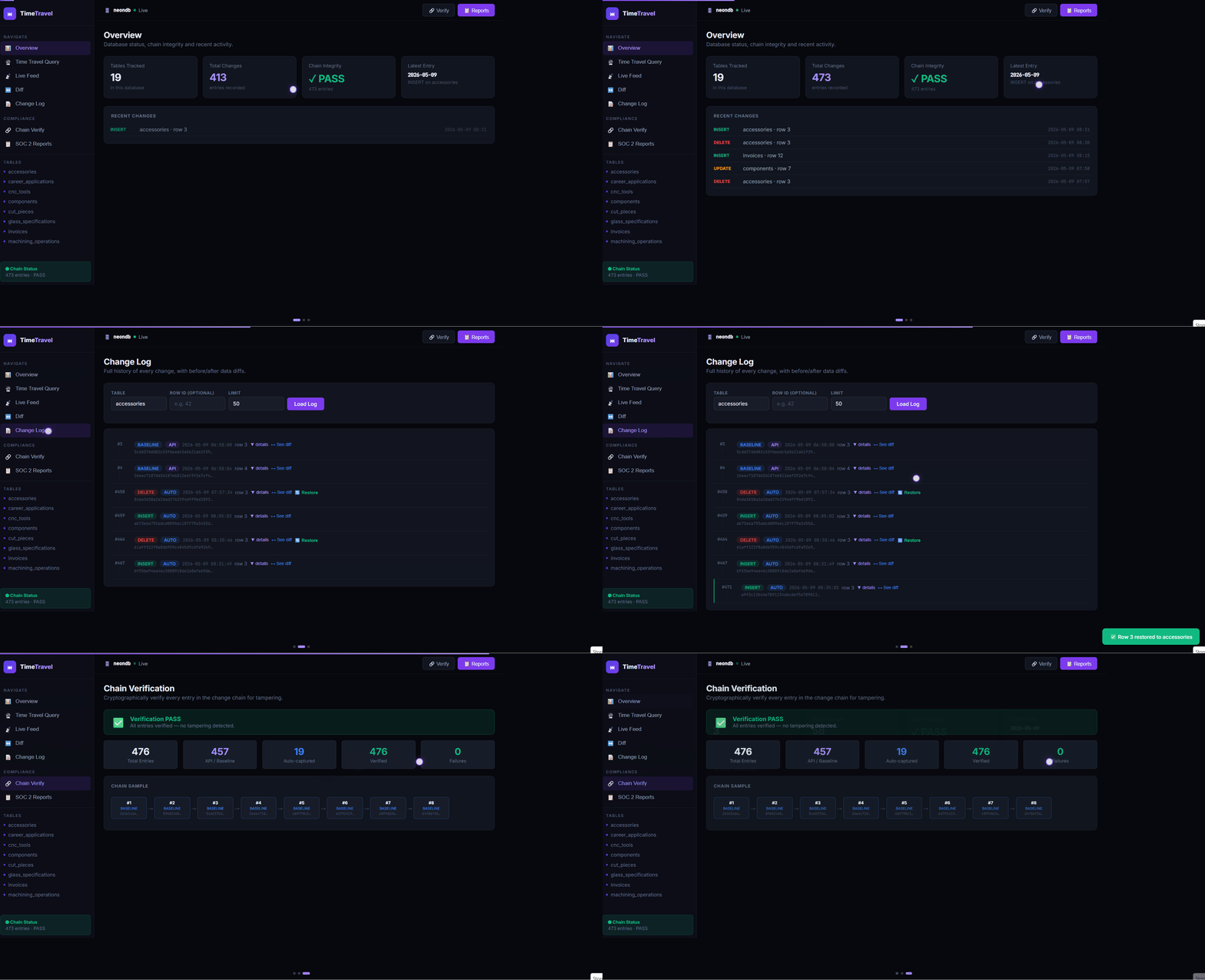
The Enterprise Dashboard in action — monitoring tracked tables, running time travel queries, and generating SOC 2 reports.
What You Get Out of the Box
The dashboard isn't just a pretty face — it's a complete operations center for your database's history. Here's every feature you can access from the browser:
| Feature | What It Does |
|---|---|
| Dashboard Overview | See all tracked tables, total changes, chain status, and system health at a glance |
| Time Travel Query | Pick a table and timestamp — see exact database state at that moment |
| Change History | Full git-style log of every INSERT, UPDATE, DELETE with old/new values |
| Data Diff | Compare database state between two dates — see what changed, was added, or removed |
| Chain Verification | One-click SHA-256 chain audit — PASS/FAIL with detailed entry-by-entry evidence |
| SOC 2 Reports | Generate Integrity, Change Audit, Retention, and Compliance reports — auditor ready |
| Table Management | Track new tables, view schema, and toggle tracking on/off from the UI |
Getting Started: Docker in 5 Minutes
The fastest way to try the Enterprise Dashboard is with Docker. Everything is packaged in a single docker-compose.yml file — no manual setup, no dependency hell.
# Clone the repo and start the dashboard
$ git clone https://github.com/zarrarerror/shayntech-timetravel.git
$ cd shayntech-timetravel
$ docker-compose up -d
# Open http://localhost:8080
That's it. Once the containers are running, you'll see the full dashboard at http://localhost:8080. The dashboard connects to your PostgreSQL database (or SQLite for testing), so you're ready to start tracking tables within seconds.
If you don't have Docker, you can also run the free CLI edition directly:
# Install via pip and run the demo
$ pip install git+https://github.com/zarrarerror/shayntech-timetravel.git
$ timetravel demo
SOC 2 Evidence at Your Fingertips
The Report Center is where TimeTravel really shines for compliance teams. With a single click, you can generate professional, auditor-ready evidence reports covering four key SOC 2 domains:
- Data Integrity Report (CC6.1, CC6.6) — Cryptographic proof that no data has been tampered with, with full hash chain verification results
- Change Audit Report (CC7.2) — Complete audit trail of every INSERT, UPDATE, and DELETE with timestamps and user attribution
- Retention Report (A1.2, A1.3) — Evidence that data is retained according to policy, with retention period verification
- Compliance Summary (CC6.1–A1.3) — Comprehensive overview with auditor attestation statements covering all SOC 2 trust criteria
Each report is available as a professional PDF that you can hand directly to your SOC 2 auditor. No more scrambling to collect evidence before an audit — it's generated automatically from your immutable hash chain.
Data Diff: See What Changed Between Two Dates
One of the most powerful features visible in the demo is the Data Diff tool. It works just like git diff but for your database tables:
- Select a start date and end date
- Choose a table to compare
- The dashboard shows you every row that was added, modified, or deleted in that period
- Color-coded output makes it easy to scan: green for additions, amber for changes, red for deletions
This is invaluable for understanding the impact of deployments, migrations, or data operations. "What changed in our orders table between Monday and Wednesday?" — one click, instant answer.
Zero Data Transfer: Your Data Stays Yours
A common question we hear is: "Where does my data go?" The answer is nowhere.
TimeTravel runs entirely on your infrastructure. The Docker containers, the dashboard, the hash chain — everything lives on your server, in your VPC, on your machine. The open-source code is fully auditable on GitHub, and there are no telemetry callbacks or data collection endpoints.
This makes TimeTravel ideal for:
- Healthcare — HIPAA-compliant environments where data cannot leave the network
- Fintech — Audit requirements demanding full control over data lineage
- Government — Classified or restricted data that must stay air-gapped
- SaaS Companies — SOC 2 Type II audits without sending data to third parties
Try TimeTravel Today
The best way to understand the TimeTravel Dashboard is to see it in action. The free CLI edition is open source (MIT license) and takes 30 seconds to install. The Enterprise Dashboard with the full web UI, PostgreSQL support, and professional PDF reports is available for $99/month.
Quick Start: docker-compose up -d → Open http://localhost:8080 → Start tracking tables. Dashboard live in under 5 minutes.
Shayntech Engineering
May 10, 2025